01 · Languages
Uzbek, Russian, English
The language is picked from the first seconds of speech, or choose it yourself. Helper words with names and terms keep them right.
Ecstasy Visuals / Plug-ins / XTC Subtitles
/01 · Subtitles for After Effects, Premiere and DaVinci
Uzbek, Russian and English speech turned into subtitles in seconds. It recognises speech right on your computer, on the graphics card, and picks the language by itself. Free, no key.
One zip: for Windows an installer (it removes the old version itself), for the Mac the panel folder. The first time, the plug-in downloads the speech model (465 MB) once.
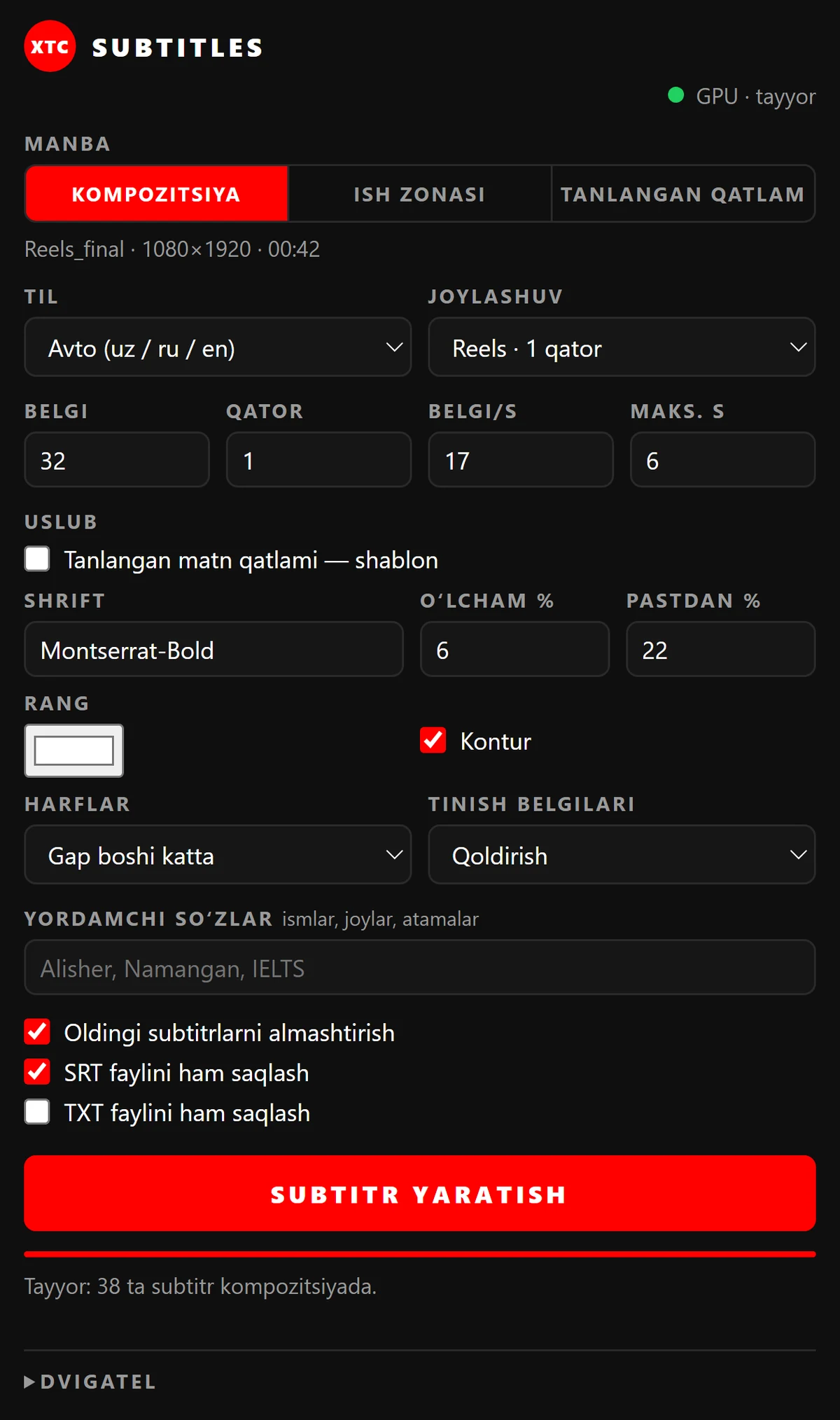
What is inside
The model was trained on Uzbek speech and runs on your own computer.
The language is picked from the first seconds of speech, or choose it yourself. Helper words with names and terms keep them right.
NVIDIA, AMD and Intel on Windows, Apple on a Mac; without a graphics card, on the processor. A 1:42 clip takes about 25 seconds, sound render included.
Line length, number of lines, reading speed and the longest phrase. Cuts at pauses and punctuation: one line for Reels or two for landscape.
Every phrase is its own text layer with exact in and out points. Style one layer as a template and its font, effects and animation repeat on every phrase.
Phrases land on the sequence's subtitle track: the whole sequence, In–Out or the selected clip.
Workspace → Scripts → XTC Subtitles: the whole timeline or In–Out, every splitting setting, subtitles on the Subtitle track.
An SRT and the full text are saved next to the project — for YouTube, Telegram or a script.
Sound goes nowhere. You can help the model with the “Oʻqitishga yuborish” (send for training) button — only if you choose to, and after you confirm.
Interface
IMG_01Getting started
One zip: inside are a Windows and a Mac folder, take yours.
Windows: run Setup.exe - it installs the panel for AE and Premiere and the script for DaVinci, and removes the old version. Mac: copy the folder as the guide in the zip says.
The first time, a button downloads the model (465 MB), once.
Window → Extensions → XTC Subtitles; in DaVinci, Workspace → Scripts.
Questions
Yes. No key, no trial, no limits.
Once, to download the model. Recognition works offline.
Windows 10 and 11, macOS 12 and newer. After Effects 2020+, Premiere Pro 2020+, DaVinci Resolve 18+. On a Mac the plug-in is not signed by Apple yet — one Terminal command, it is in the guide.
Remove it in Settings → Apps → XTC Subtitles to free about 3 GB. The new version is 80 times smaller and does not need the old one.
Correct the subtitle text and press “Oʻqitishga yuborish” (send for training). The model learns from such corrections.
/06 · XTC Subtitles 2.0.1
Free. No key. Windows and Mac.